If you are using Realtek HD Audio Driver, then you might see RtHDVCpl.exe running at background. Find how to fix application error on your Windows OS. RtHDVCpl.exe is a program that frequently creates doubts for users regarding its source, genuinity and author. What adds to the confusion is the empty process description box. So there can be two chances, either your system has Realtek’s’ HD audio and RtHDVCpl.exe is running being its component or it could be a malicious “.exe” file in a disguise.

As said above, if you have the RealTek High Definition Audio installed in your computer you may find the program RtHDVCpl.exe during Windows startup.
Quick Overivew
What is RtHDVCpl.exe?
RtHDVCpl.exe is actually a component of Realteks’ High definition audio driver software. Realtek high definition audio driver is basically the interface that facilitates interaction between Realtek HD audio card and windows OS. As a genuine part of Realtek HD audio driver, this RtHDVCpl.exe runs a panel to configure volume settings through an HD volume control panel.
It starts when windows starts so that the panel for audio control can be activated soon for you to operate and use. On observing irregularities related to this program, you can disable it anytime and that won’t significantly affect the functioning of your computer.
File Size
The file is mostly located inside C:\ drive of windows operating system. Though the file has up to 40 various sizes, it mostly is of 4.7 Mb on Windows 10/8/XP, however the file size of RtHDVCpl.exe could be around 11 Mb in Windows 7.
File Location
If the file is located in “C\:Program Files” the security rating is improved to being 15% dangerous. The file size could be 13179660 bytes or any of the 72 other variants but the file is a VeriSign and Microsoft signed file. This enhances its trustworthiness despite it not being a windows system file.
How to fix errors related to RtHDVCpl.exe ?
RtHDVCpl.exe application is stored in your system and start as soon the computer startup. File might be corrupted due to system crash or driver update. You might see below error on your system:
RtHDVCpl.exe – Unable to locate component. This application has failed to load because PROPSYS.DLL was not found. Reinstalling the application may fix this problem
If you see this type of error, then best option will be to reinstall the Audio driver.
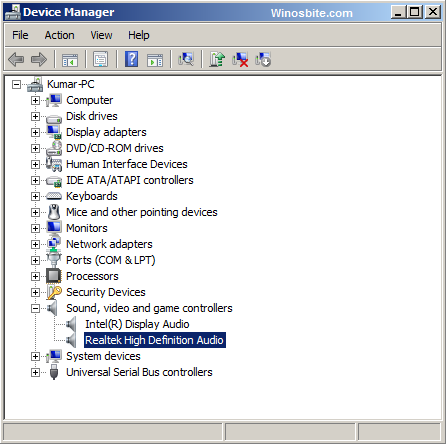
- Right Click on My Computer click on Properties
- Click on Device Manager
- Now click + Sing beside ‘Sound, Video, and Game Controllers‘
- Now right click on Realtek High Definition Audio and click on Update Driver Software
- Click on Browse my Computer for Driver Software
- Enter CD or Pen drive on your computer on which driver is stored and click on Next.
 How to uninstall RtHDVCpl?

If you are working on Desktop computer and don’t need sound then you can remove RtHDVCpl from your system.
- Press Ctrl + R button
- Type devmgmt.msc and hit Enter
- Click on Sound, Video, and Game Controllers
- Right click on Realtek High Definition Audio and click on Uninstall
Security
If the file location of RtHDVCpl.exe is under C:\Windows\System32 folder, then the technical security is low and considered safe. The file size could be 39424 bytes, 26112 or 30208 Bytes. It is a compressed file that can run and monitor all system applications and is definitely not a windows system file.
The technical probability of danger from the file is 38% because it captures keyboard and mouse inputs and can manipulate or the change the behaviors and functioning of other programs on the system.
To make sure your system stays safe, running antivirus software to scan for problems would always be a wise move.