This file kbdclass.sys is an essential part of Windows 7/8/10 OS and is a keyboard driver. Find common error and how to fix corrupted file. Keyboard Class Driver or kbdclass.sys is a software component file for Windows operating system. This is a core file for Windows users and is already present in your system since the time of installation of the Windows. The file is important for the operating system to support the drivers that connect the keyboard to the software. The file has a direct access to the software of the system and is responsible for software and hardware connectivity during the time the system is working.
Quick Overivew
What is kbdclass.sys
This system file is important for Windows to understand and take the input that is provided through a keyboard. In simple words, this program files helps the system to understand what is being typed on the keyboard and display it on the monitor.
Uses of kbdclass.sys
It is a core file of Windows and is necessary for the working of the system. In some cases, there are third party drivers that can help the user to configure Windows with the keyboard. However, this program file is the most genuine and generic and supports all major types of keyboards.
File Location
By default, the genuine kbdclass.sys file will be located in C:\Windows\System32\drivers folder of your system.
The file size could be from 0.02 Mb to 0.035 Mb.
In most of the cases, it will not appear as a visible program running on the system. However, in certain cases, users can get errors related to kbdclass.sys. It can be either due to a glitch in installation or a bug which can be removed by uninstalling the existing file from Control Panel and downloading it again.
Common Error of kbdclass.sys
Following are few most common errors that you can see on your computer:
- STOP 0x0000000A: IRQL_NOT_LESS_EQUAL
- STOP 0x0000001E: KMODE_EXCEPTION_NOT_HANDLED
- STOP 0×00000050: PAGE_FAULT_IN_NONPAGED_AREA
How to Fix kbdclass.sys Error
If you are seeing kbdclass.sys errors that means the keyboard driver is not working properly. In most of the cases, it’s just a driver issue, which can be fix by follow below methods:
Method 1
- Remove all external hardware like Pen drive from your computer and keep only keyboard and mouse.
- Now, restart the computer.
- And start other hardware one by one to identify which particular one is causing the issue.
Method 2
- My Computer >> Right Click and click on Properties
- Click on Device Manager located on left hand side.
- Click on + Sign located beside Keyboards
- Now, Right Click on Sub-directory HID Keyboard Device and click on Update Driver Software
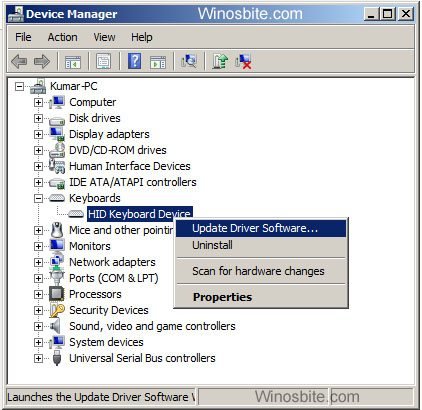
- Click on “Search automatically for updated driver software“
- It will automatically update the driver from your local PC, otherwise use “Browse my computer for Driver Software” option to update the driver.
Method 3
- Press Windows + R button, type CMD and hit Enter button
- Type exactly ‘sfc /scannow‘ and press Enter button
- It will start repairing computer, wait for few minute to finish it.
Method 4
This is the last but most efficient method to fix kbdclass.sys error, without changing your desktop files.
- Click on Start Button
- Type System Restore and hit Enter button
- Wait for few seconds to load System Restore option
- Click on Next and choose last restore date from the list and click on Next.
- Let the computer to restore your system.
Very few users might encounter with kbdclass.sys errors, however it can be fix by following above given method.
If you like above information, then you also might like reading this: