Skip to content

Ankita

Founder and Writer @ WinOSBite. Future plan is to make this platform open to community to resolve and discuss various issues, usage related to Operating System.

Disk Cleanup using Run Command and 3 Ways for Windows 10, XP

You can launch the Disk Cleanup tool using 4 different ways which are command line, manual and tricks. You can also perform command for instant disk cleanup. This guide will share tips on how you can perform a Disk Cleanup. This will conduct a search on the computer with causing any problems with the other files. Here is how to go about the process.
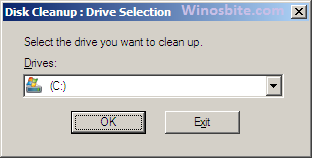
Disk cleanup

Read More »Disk Cleanup using Run Command and 3 Ways for Windows 10, XP

Toolbar missing, How to Turn off Auto-Hide Menu in Excel

It’s really irritating if the menu bar is missing and every time you have to click on top menu to show the tool. I found one easy method to turn off auto-hide menu from the Microsoft Excel.  It will work on mostly all MS Office from 2007, 2010, 2013 and 2016.  If you are the one who use Excel sheet on regular basis and need to use formatting toolbar like Clipboard, Font, Alignment etc then this will surely help you.

Show hidden menu bar in Excel

Read More »Toolbar missing, How to Turn off Auto-Hide Menu in Excel

How to Fix Error Code 0xc0000142 in Windows 10

Majority of the Windows 10 users have seen Error code 0xc0000142, however there are several ways to fix this error.  And when you see the error “Code 0xc0000142” it usually means that you are not able to open any program or particular application on your computer. This can happen because some files from the directory need to be fixed or rectified.  You will see below message on your Windows 10 whenever you encounter this issue:

The application was unable to start correctly (0xc0000142). Click OK to close the application.

Read More »How to Fix Error Code 0xc0000142 in Windows 10

How to Fix Windows 10 Store Error Code 0x803F8001

One of the most common error codes faced by the users of the Windows Operating System is the error code 0x803F8001. A lot of the Windows 8 and 10 users have reported that this error code has occurred when they were trying to download/install the updates in the Windows Store for the apps. With time, a lot of the apps get outdated and they need to be updated to get all the latest features. While trying to do so, the computer has been known to display this message

“Try that again. Something went wrong. The error code is 0x803F8001, in case you need it”

Read More »How to Fix Windows 10 Store Error Code 0x803F8001

Wondering when Windows was installed on the Computer? Find Date and Time..

So you have Windows 10 or 8 or 7 installed on your computer but don’t know the install time and date? There might be several reasons behind finding out the installation date and majority of the user find it hard to know it.  In this post I will guide you how to figure out how old your computer is (or when the last time you install), read on!

Read More »Wondering when Windows was installed on the Computer? Find Date and Time..

What is Msmpeng.exe – Uses & How to Disable it?

It is rather common to see articles that label msmpeng.exe  a virus that is really ironic as it is a component of internal windows defender against malware. Msmpeng is the short form of Microsoft Malware Protection Engine. You might notice under task manager that sometimes msmpeng.exe is consuming high CPU resources. In this post, I will provide information about this file in detail.

Read More »What is Msmpeng.exe – Uses & How to Disable it?